What is a Branch?
A Git branch is a movable reference to a line of development. More precisely, a branch points to a commit in the repository history. When new commits are made on that branch, the branch reference moves forward to the newest commit.
Branches allow you to work on changes without immediately changing another branch. This makes it possible to keep production code separate from work that is still being developed and tested.
Think of a branch as an independent working line within the same repository. The files in your working directory change according to the branch you have currently checked out.
For example, if main contains the current production
version, you can create a feature branch from it and make several
commits there. Those commits belong to the feature branch until the
work is eventually merged into another branch.
main Branch
In this guide, main represents the production branch. It is the
branch that contains the version of the project intended to be deployed to the
production website.
Git does not require main to be the production branch. This is a
workflow convention used by this guide. Teams can choose different branch
strategies, but using main as the production branch keeps the
workflow simple for this project.
mainContains the version of the project that is intended for production.
Development work should normally happen on a feature branch
rather than directly on main.
Keeping main stable makes it easier to review,
test, and deploy changes without mixing unfinished work into the
production branch.
Feature Branches
A feature branch is created from main for a specific piece of
development work.
Once the feature branch is created, new commits can be made there without
changing the commits on main. This gives you a separate place to
develop and test the change.
main
│
└── feature/homepage
Examples of feature branches include:
feature/homepageDevelopment of the homepage.
feature/contact-pageDevelopment of a contact page.
feature/navigationDevelopment of navigation changes.
The feature/ prefix is a naming convention used in this
guide. Git does not require this format. The important part is that
the name clearly communicates the purpose of the branch.
Creating a Branch
Start from the branch you want to use as the foundation for your new work. In
this guide, that branch is usually main.
Before creating the feature branch, update your local
main so that the new work starts from the latest version available
on GitHub.
git switch main
git pull
git switch -c feature/homepage
The first command switches to main. The
git pull command retrieves and integrates the latest changes from
the configured remote branch. The final command creates a new branch named
feature/homepage
and switches to it immediately.
After the final command, your working directory is on the new feature branch.
Any commits you make for the homepage work will belong to that branch rather
than directly to main.
Starting from an up-to-date base branch reduces the chance that you begin new work from an outdated version of the project.
Switching Branches
Use git switch to move between existing branches.
git switch maingit switch feature/homepageWhen you switch branches, Git updates the files in your working directory to match the commit at the tip of the branch you switched to.
Before switching branches, make sure you understand what will happen to any uncommitted changes in your working tree.
If switching would overwrite local changes, Git may prevent the operation. A safe habit is to commit your work or deliberately handle the changes before switching branches.
Branch Naming
Clear branch names make it easier to understand what a branch is intended to contain.
This guide uses a simple feature/ prefix for branches that
contain new development work. The naming convention is a team choice; Git
itself does not require a particular naming format.
| Branch | Purpose |
|---|---|
main | Production code. |
feature/homepage | Homepage development. |
feature/navigation | Navigation development. |
A good branch name should be short enough to read easily and specific enough to explain the work it represents.
Branch Workflow
The branch model used throughout this guide can be summarized as:
main
│
├── feature/homepage
│
├── feature/navigation
│
└── feature/contact-page
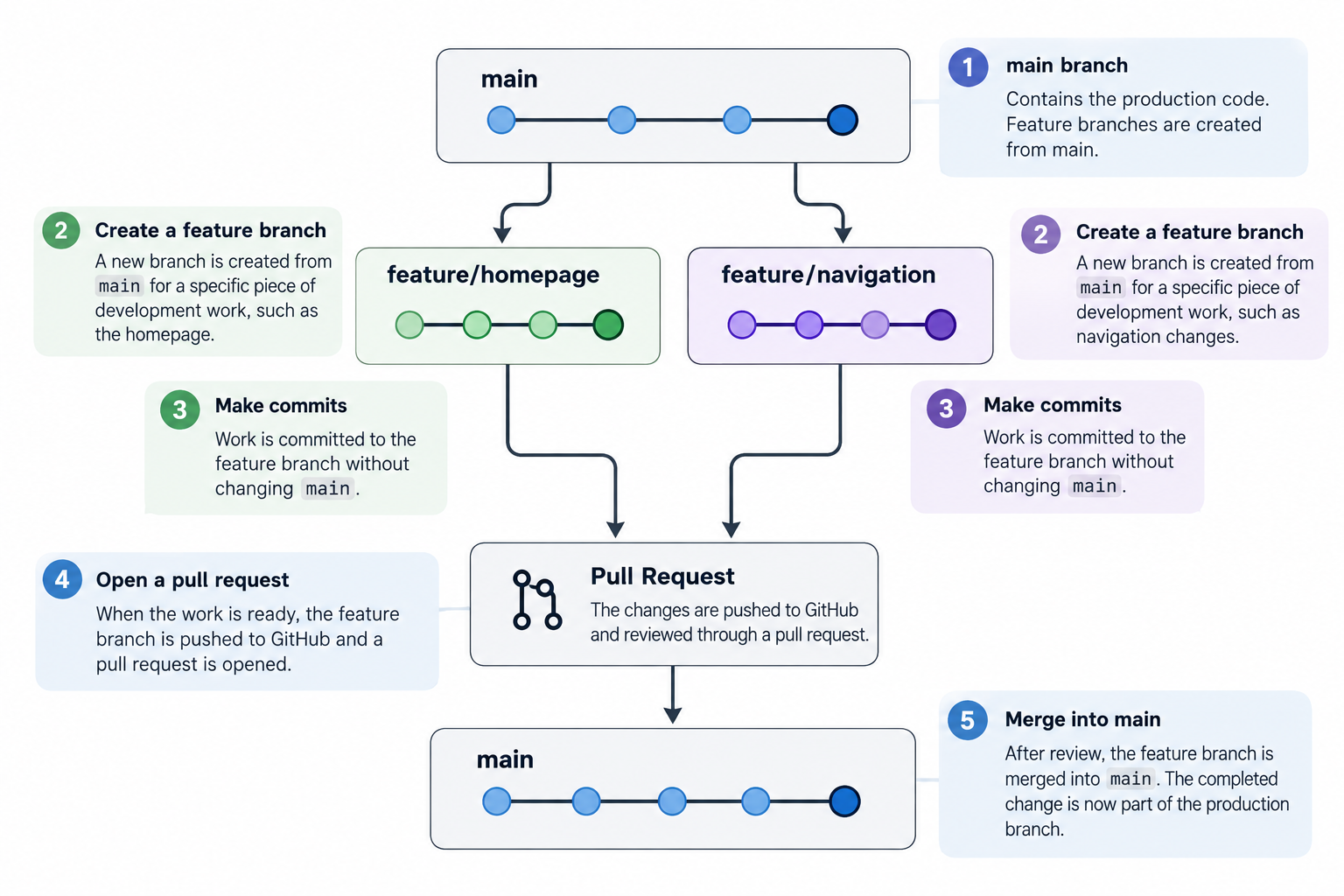
A feature branch is developed and tested independently. The changes can be
committed to that branch without changing
main.
Once the work is ready, the feature branch can be pushed to GitHub and
reviewed through a pull request before being merged into
main.
After the merge, main contains the completed change and can
continue through the production deployment workflow described later in this
guide.
Keep each feature branch focused on a clearly defined piece of work. Smaller branches are generally easier to review and troubleshoot.